
P13 +3P7 ASTRecorded ✓
THE VOICE-POWERED BASKETBALL PLATFORM
Say it.
Stat it.
Record every shot with your voice, then turn the final box score into clear insights that help your players and team improve.
Voice-first for speed. Manual scoring is always available whenever you need it.
WHAT IS STATCOURT?
Keep your eyes on the game, not the stat sheet.
Statcourt replaces slow, manual stat entry with natural voice commands.
Call the player, location and result as the action happens. We record the box score, map every shot and turn the game into insights you can actually use.
Play. Track. Analyse. Elevate.
Prepare your team, record the action, understand your performance and build on every game.
VOICE-POWERED GAME SCORING
Game Day Tracking
Track the game without losing the game.
Voice Scoring helps the scorer keep pace with fast gameplay while manual controls remain available at every moment.
- Natural basketball commands. Call identified players and events without navigating stat forms.
- Multiple events in sequence. Properly identified player commands can be processed together.
- Validation before recording. If Statcourt can't identify the player or understand the command, it rejects the event instead of guessing.
- Simple undo. Reverse the latest event one action at a time.
LISTENINGLIVE GAME
P7 DREBRecorded ✓
P0 REBP35 +2P2 ASTRecorded ✓
Prefer touch?Manual scoring stays available.
INSIDE STATCOURT
Everything your team needs in one hub.
Move from game day to player development without switching tools. Statcourt keeps your results, shooting data, training and team leaders connected.
TEAM OVERVIEW
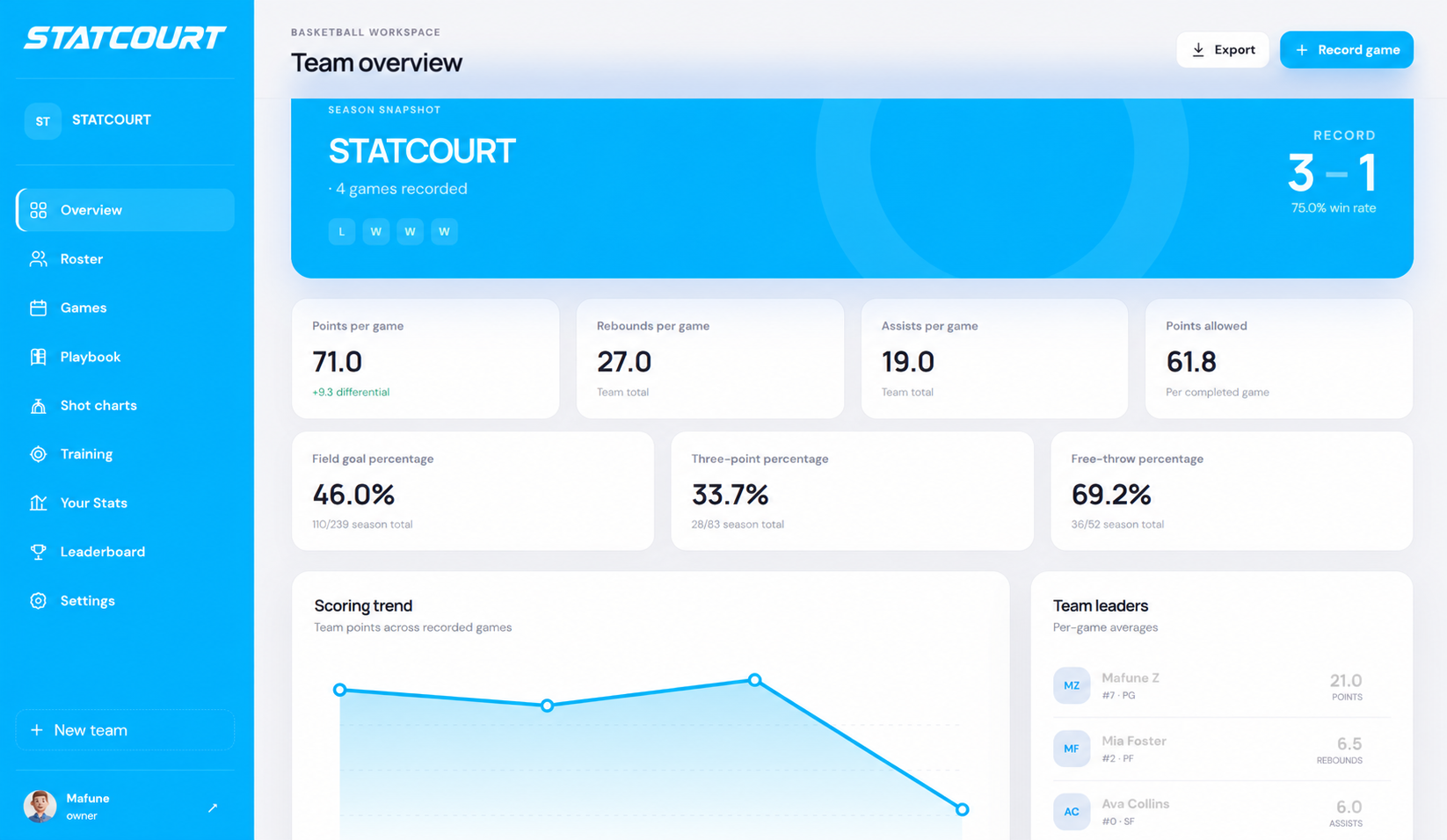
Game Centre
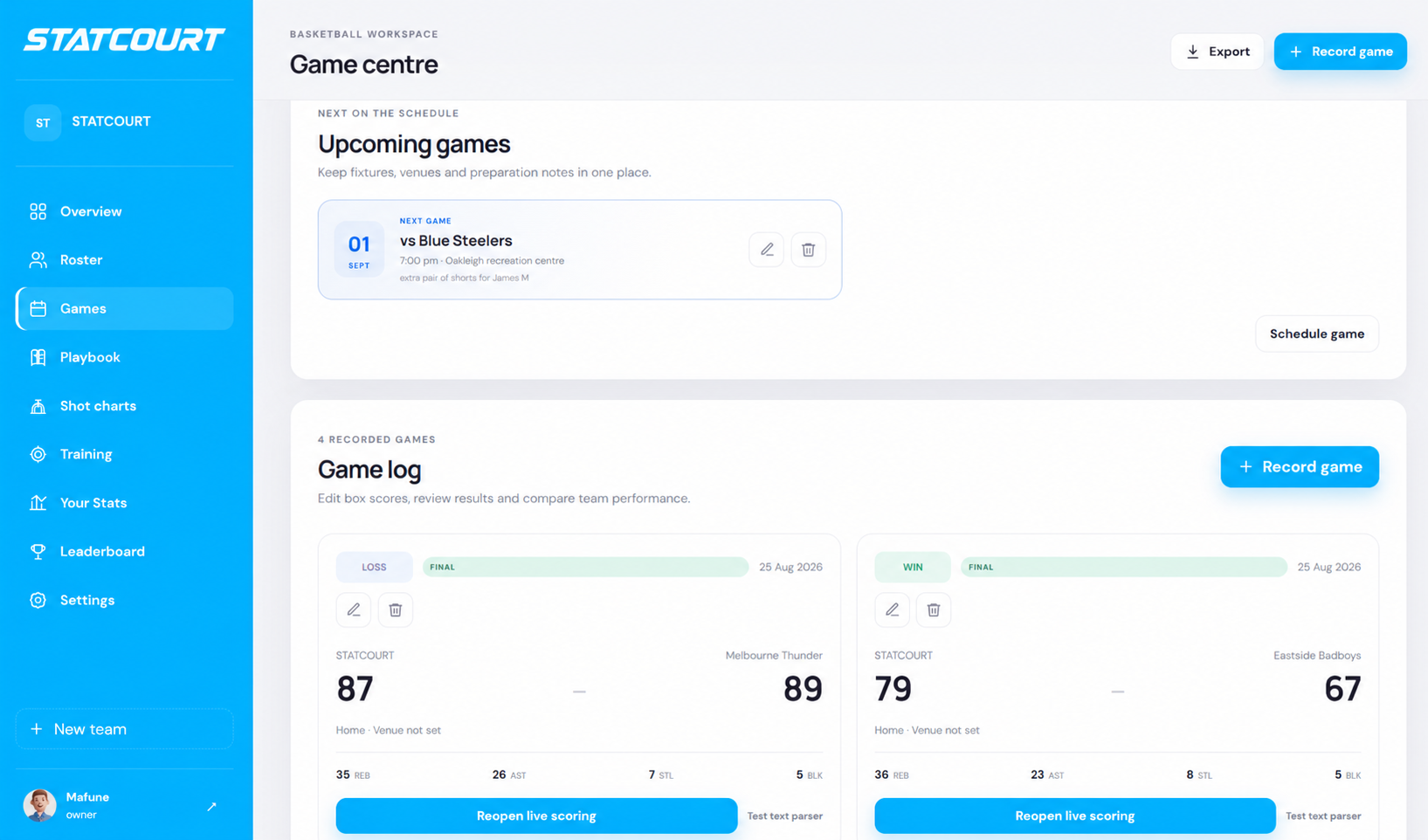
Schedule upcoming fixtures, record games and review results in one place. Open any game to see the final score, team totals and complete player box scores.
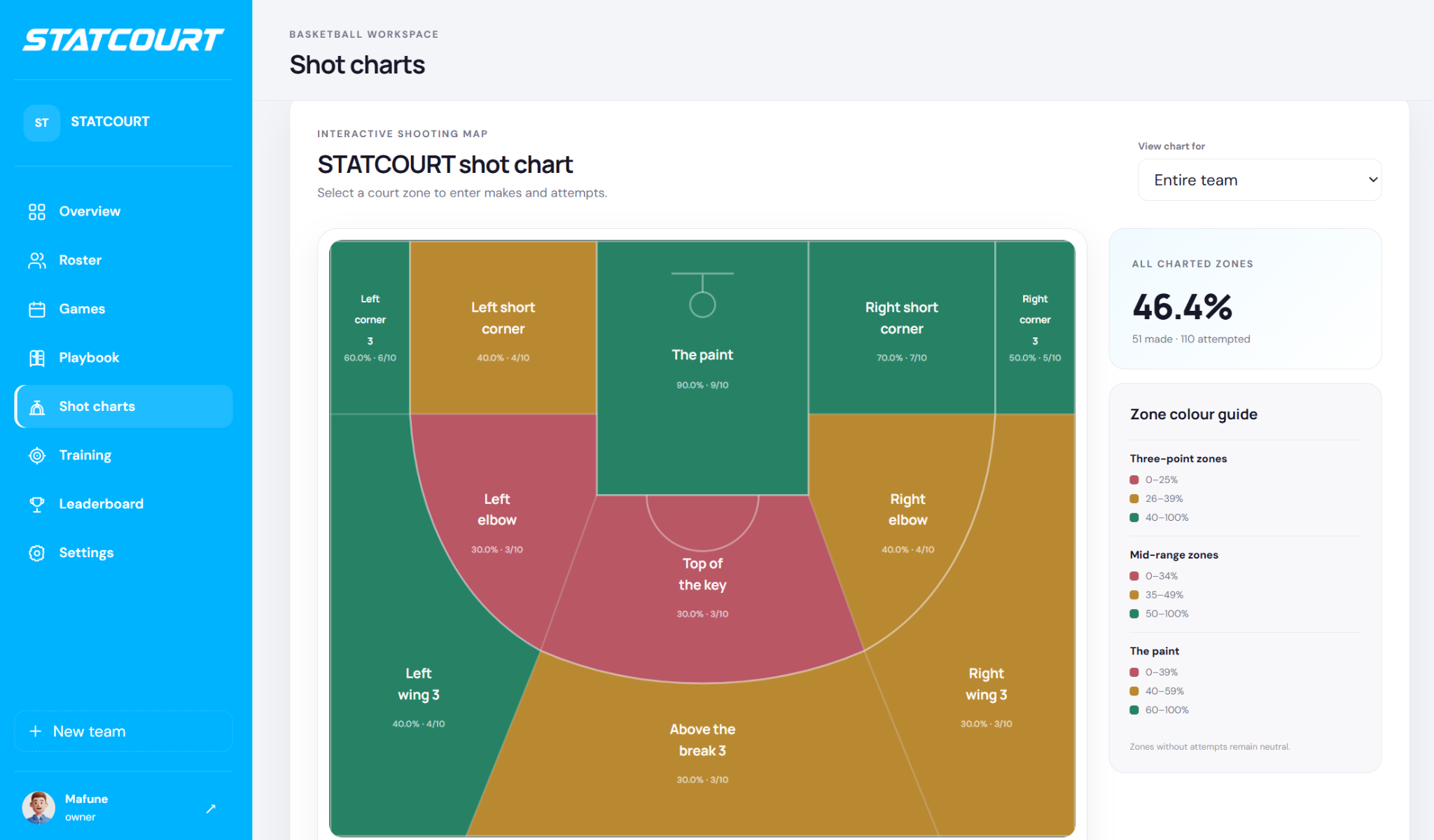
Team and player shot charts
See shooting percentages across every court zone. View the whole team or select one player to understand hot zones, shot selection and where improvement is needed.
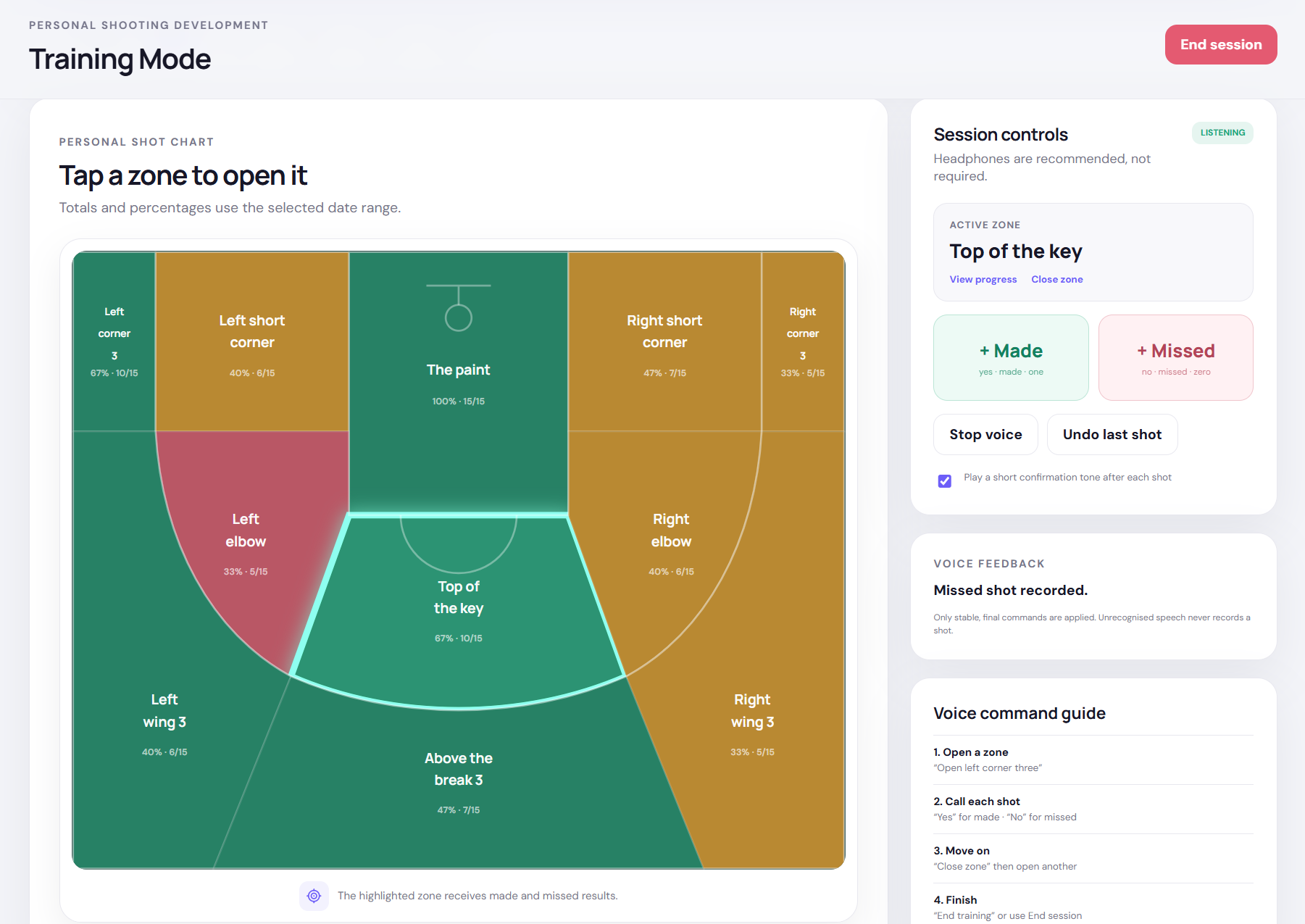
Voice-powered Training Mode
Open a court zone by voice, then call only “made” or “missed” after each shot. Close the zone when you're finished and review your shooting results by location.
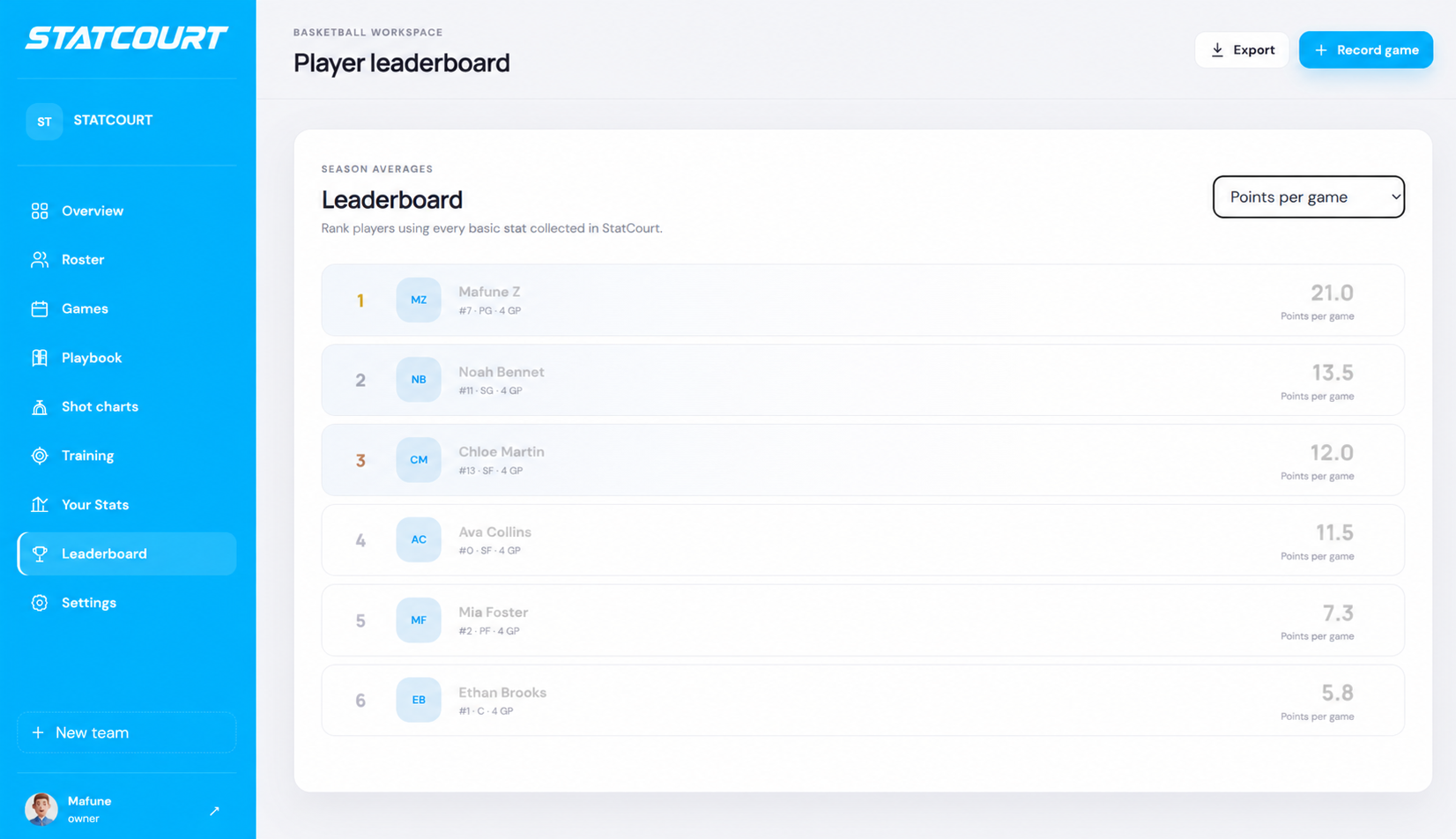
Player leaderboard
Rank players using the statistics collected across recorded games. Compare points, assists and other performance measures to see who is leading the team.
MORE THAN A BOX SCORE
Advanced Team Stats
Go beyond the box score with clear team intelligence built from the games you record.
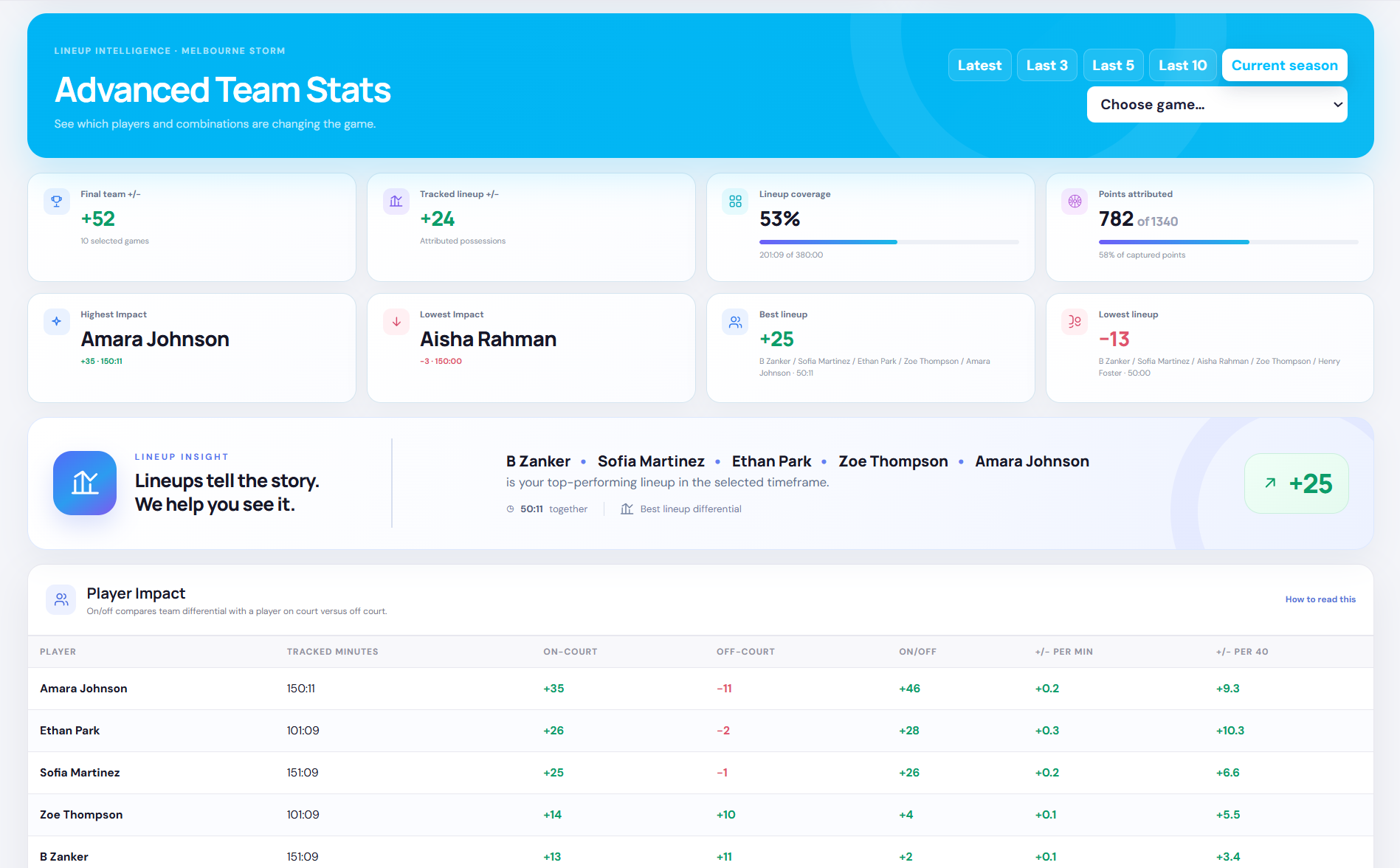
Player impact
Compare the team's performance with each player on and off the court.
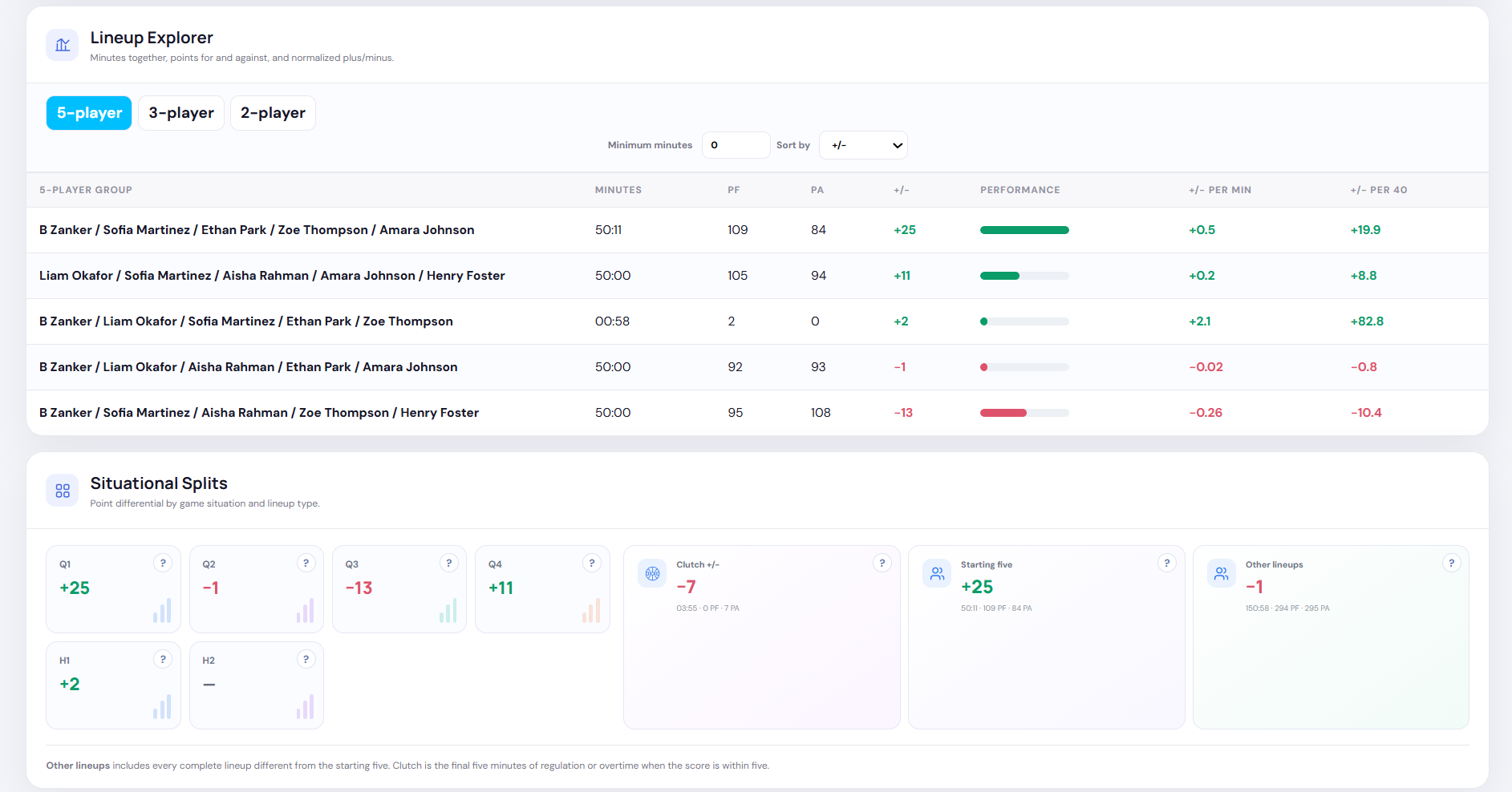
Lineup intelligence
Find the five-player, three-player and two-player combinations delivering the strongest results.
Situational splits
Understand point differential by quarter, starting lineup and clutch situations.
PERSONAL SHOOTING DEVELOPMENT
Training Mode
Your personal shooting session, tracked by voice.
Start by opening the spot you're shooting from—for example, say “open left wing three.”
Once the zone is active, simply call “made” or “missed” after every attempt. Statcourt records each result in that court zone, so you can keep shooting without touching your phone. When you're finished there, say “close zone” before opening your next spot.
- Open any court zone by voice
- Call made or missed for each shot
- Close and switch zones hands-free
- Review your complete shot chart
LISTENINGTRAINING MODE
“Made.”
SHOT RECORDEDLeft wing 3 | 1/1
LIVESTATCOURT COMPLETE
MONTHLY SUBSCRIPTIONSIMPLE MONTHLY ACCESS
Affordable for teams and players.
One low-cost monthly subscription for the entire Statcourt feature set, with no complicated tiers.
- AI voice stat recording
- Game Mode and Training Mode
- Live and final box scores
- Advanced team and lineup statistics
- Player shot charts
- Team and player visual insights
- All future core app updates
Final pricing will be announced before launch.
SIMPLE PRICING
One plan. Every feature.
Statcourt will be available through an affordable monthly subscription, giving every subscribed player the complete experience—from hands-free training to game-day recording and post-game analysis.
Record together
Build complete team and player box scores with voice.
Improve alone
Track personal makes, misses and shooting zones.
Learn from data
Turn every session and game into clear visual feedback.
FAQ
Questions before tip-off?
Here are the essentials about subscriptions, teams, scoring and personal training data.
What does a Statcourt subscription include?+
Every subscribed player receives access to the complete Statcourt feature set, including team tools, game scoring, advanced team statistics, dashboards, box scores, shot charts, leaderboards and personal Training Mode.
How will Statcourt be priced?+
Statcourt will use a simple, affordable monthly subscription. Final launch pricing will be announced before release, with the complete feature set included and no complicated tiers.
Does every roster player need an account?+
No. Team Owners can build a complete roster and record games before every player creates an account. A member can later link their account to an available roster player after approval.
Do I have to use voice scoring?+
No. Voice scoring is designed to make recording faster, while clear manual controls remain available throughout every game and training session.
How does voice-powered Training Mode work?+
Open a court zone by voice, call “made” or “missed” after each shot, then say “close zone” when you are finished. Statcourt records every attempt in the active zone and builds your personal shot chart.
What do I need to use Statcourt?+
A modern web browser is enough for the core app. Voice features require microphone permission, and headphones are recommended in noisy environments but are not required.
Can completed game statistics be corrected?+
Yes. Completed games can be reopened, corrected and saved again so the official team and player statistics remain accurate.
ABOUT STATCOURT
The game evolved.
Stat recording didn't.
We're three university students from Melbourne who love basketball and kept seeing the same problem: recording statistics still relied on slow, manual processes that pulled attention away from the court.
Important details were missed, final box scores took effort to complete and the data often stopped at a table of numbers. Teams had information, but not always the insights needed to improve.
That's why we created Statcourt, a voice-powered way to capture the action as it happens and transform it into useful player and team insights.
- Statcourt Team
OUR MISSION
Make quality basketball insights accessible to every team and player.
LAUNCHING SOON
Say it. Stat it.
See the game clearly.
One place to capture the action, understand the numbers and help every player improve.
Contact Statcourt01 / GAME DAYKeep up with the game.
Record stats by voice or use manual scoring.
02 / TEAM HUBSee the whole picture.
Box scores, shot charts and team insights together.
03 / TRAININGMake every shot count.
Track makes and misses across the court.